Canvas Short Tutorials
Description
Welcome to our collection of student tutorials and guides designed to help you successfully navigate the Canvas LMS platform. You'll find useful tools and features to enhance your overall learning experience at Southern University and A&M College.
Canvas Overview
Canvas Mobile Login
Logging in using the Canvas Student App
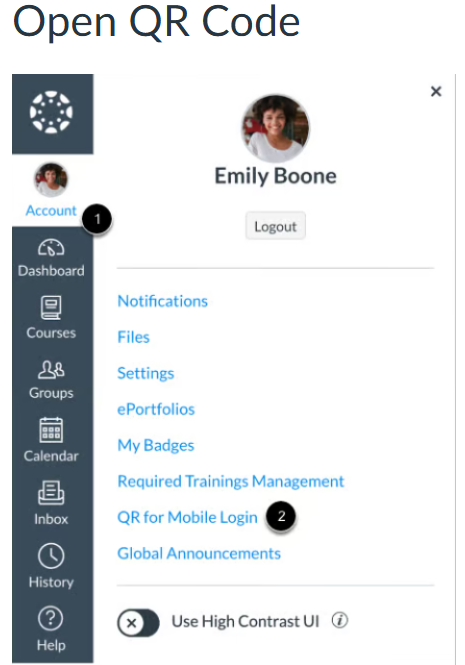
- Description:The Canvas Student App is intended to be used on your Mobile device (phone) and can be downloaded on an Android or iOS devices (iPhones). To download the App: From your Canvas Global Navigation (as shown below), click the Account[1] link, then click QR Code for Mobile Login[2].
- Followed by below Diagram image:
How to view your Assignments
How to approximate your Assignment scores using the What-If Grades feature
How to know if you have a Peer Review Assignment to Complete
How to Submit a Peer Review to a Discussion